

Description
CAUTION: Additional connection equipment required for RTK
To use this Network RTK service with a compatible handheld controller, choose one of these two internet connections:
- Phone hotspot: connect the controller to your phone’s Wi-Fi hotspot. You do not need to buy a separate 4G dongle just to provide internet this way.
- DJI 4G dongle: purchase the correct compatible DJI Cellular Dongle for your controller and use a supported, active SIM with a suitable data plan.
The subscription does not include a cellular dongle, controller, aircraft or any required RTK hardware. A SIM is supplied only with the plans that expressly include one. Internet access, supported RTK hardware and a correction-service account are separate requirements.
Need a 4G dongle? Choose the correct controller generation:
Shop DJI Cellular Dongle — first generationShop DJI Cellular Dongle 2
RC Pro Enterprise: first-generation DJI Cellular Dongle. RC Plus 2 Enterprise / Enterprise Enhanced: DJI Cellular Dongle 2. Check the exact controller manual and regional compatibility before purchase.
Two ways to connect a compatible handheld controller
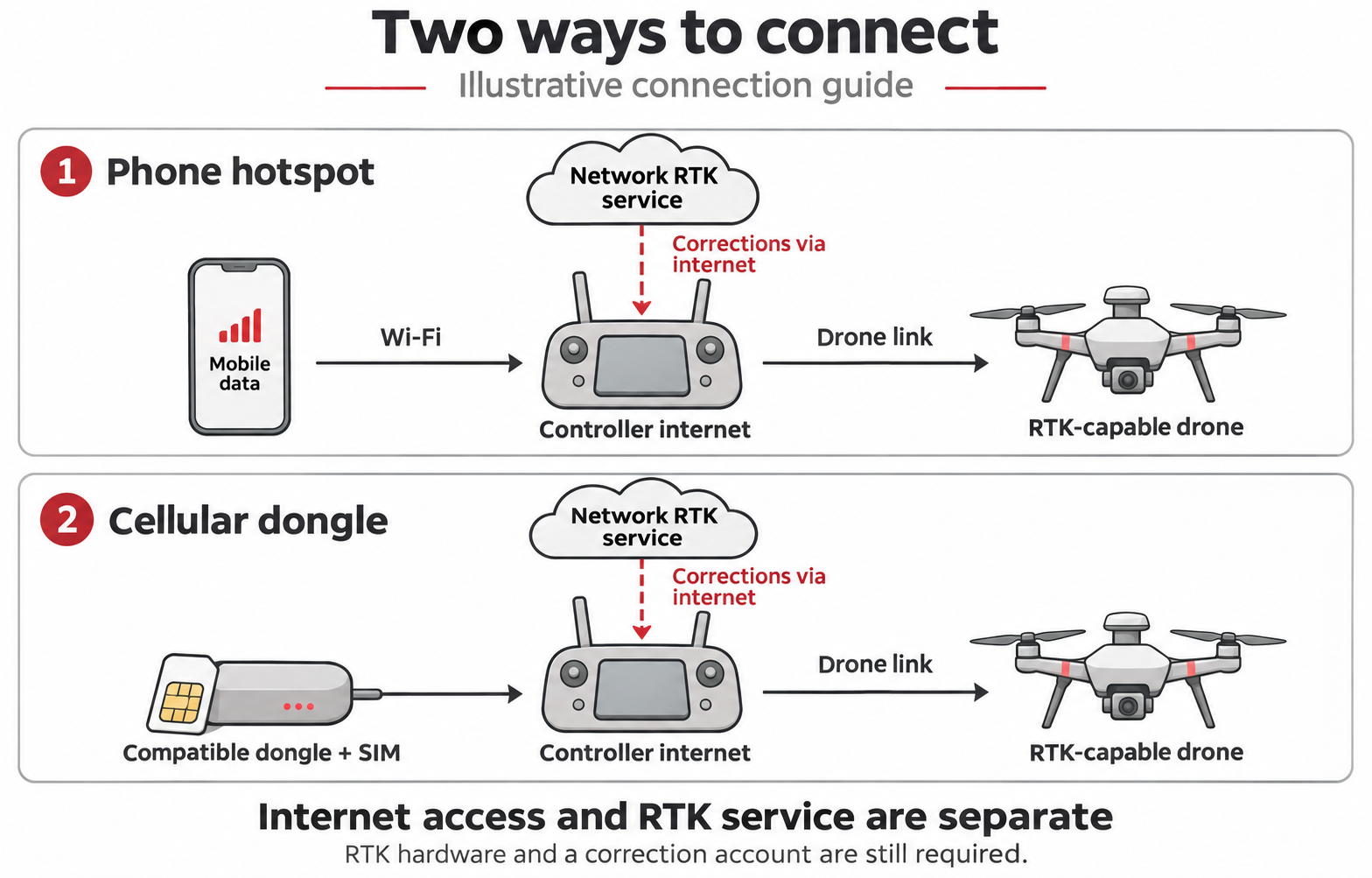
1. Use your phone’s Wi-Fi hotspot
- Confirm required RTK hardware and a compatible controller.
- Use a phone with an active data plan that permits hotspot tethering.
- Connect the controller to the phone’s Wi-Fi and confirm internet access.
- Use the device’s supported Network RTK/NTRIP settings with the service account.
- Check connection and RTK status, then follow the device manual for the survey.
A hotspot supplies internet. It does not supply an RTK correction account or add an RTK receiver to an unsupported aircraft. Check your phone’s data plan and tethering allowance.
2. Use a supported cellular dongle
- Check the exact controller manual and install its supported cellular dongle and suitable nano-SIM.
- Confirm the SIM is active and check the mobile-data connection and APN, where required.
- Open the supported Network RTK / Custom Network RTK settings in the flight application.
- Enter the service-issued NTRIP host, port, account and mountpoint as instructed; do not guess these values.
- Check the connection and RTK status before capture. Follow the aircraft manual and survey quality-control procedure.
Choose the correct dongle generation for the controller. A SIM is included only where the selected service plan says so; do not assume that every supplied SIM works in every phone or DJI module.
First-generation DJI Cellular Dongle and DJI Cellular Dongle 2 remain optional, separately purchased connection accessories. Check the controller generation before choosing one.
Network RTK corrections for your surveying workflow
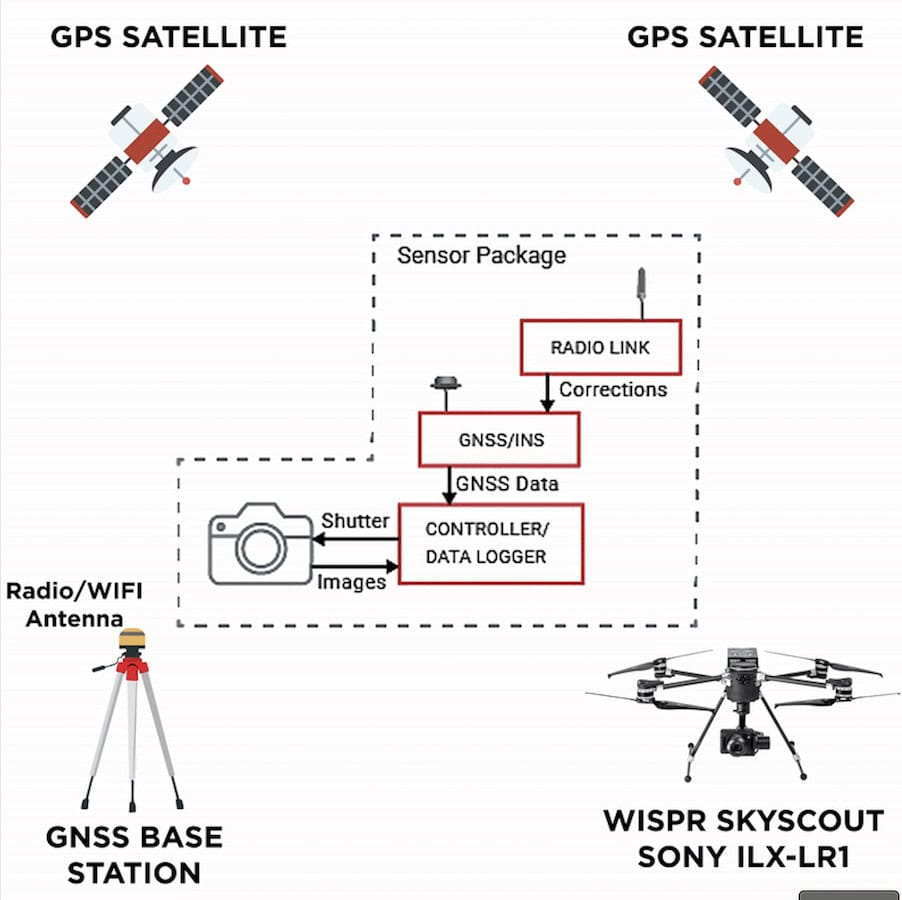
The Network RTK Corrections subscription delivers GNSS correction data for compatible drones and controllers. It is not a physical base station but a service that requires a supported controller, RTK hardware, and an internet connection. Users can connect via a phone hotspot or a correct-generation cellular dongle with a supported SIM. The service is separate from the aircraft, controller, and network installation hardware.
Choose a time allowance for the work you actually do: occasional inspections, repeat mapping visits or a full season of surveying. This subscription delivers correction data over NTRIP. It does not replace the aircraft’s RTK receiver, provide mobile coverage or include a physical base station.
Choose your correction-service plan
Allowances and validity periods differ. Choose an own-data plan if you already provide a suitable internet connection; choose a drone-only SIM plan when that service arrangement fits your equipment and work.
| Plan | Excl. VAT | Incl. VAT | Internet |
|---|---|---|---|
| 14 Days | €120.00 | €147.60 | Own internet |
| 20 Hours / 1 Month | €190.00 | €233.70 | Own internet |
| 60 Hours / 12 Months | €590.00 | €725.70 | Own internet |
| 120 Hours / 12 Months | €980.00 | €1,205.40 | Own internet |
| 240 Hours / Quarter | €1,180.00 | €1,451.40 | Multi-network SIM, 1GB/month |
| 600 Hours / 12 Months | €1,390.00 | €1,709.70 | Own internet |
| 12 Months Unlimited | €1,580.00 | €1,943.40 | Multi-network SIM, 1GB/month |
The 20-hour plan is valid for one month. It is not 240 hours of flexible annual use. The five individual own-data plans allow one active connection; unused metered hours expire at the end of their validity period.
The quarterly SIM plan provides 240 hours each quarter during the twelve-month licence. It is metered by the second. Quarter boundaries, carry-over, overage, concurrency and renewal details must be checked before purchase. Unlimited hours also do not mean unlimited devices connected at once.
Check your aircraft, controller and network
The table describes ways to provide internet to supported equipment. It is not a blanket promise that every service tier works on every listed device. Confirm the selected service, supported corrections, firmware and project location before ordering.
| Equipment | Controller / installation | Internet route | Selection check |
|---|---|---|---|
| Mavic 3E / 3T | RC Pro Enterprise | Phone Wi-Fi hotspot or first-generation DJI Cellular Dongle | Compatible RTK module is required separately. |
| Mavic 3M | RC Pro Enterprise | Phone Wi-Fi hotspot or first-generation DJI Cellular Dongle | RTK module is preinstalled; confirm service and receiver settings. |
| Matrice 4E / 4T | RC Plus 2 Enterprise | Phone Wi-Fi hotspot or DJI Cellular Dongle 2 | Aircraft has integrated RTK. Check service compatibility and correction format. |
| Matrice 400 | RC Plus 2 Enterprise Enhanced | Phone Wi-Fi hotspot or DJI Cellular Dongle 2 | Aircraft enhanced-transmission dongles are a separate installation and are not the basic controller NTRIP requirement. |
| Matrice 4D / 4TD — handheld | RC Plus 2 Enterprise | Phone Wi-Fi hotspot or DJI Cellular Dongle 2 | This refers to handheld controller operation, not every unattended Dock installation. |
| Dock 3 — unattended | Project-specific network | Suitable permanent wired or supported Dock cellular connection | Confirm Dock configuration, licence applicability and a reliable site connection before ordering. |
| Agras T100 / T70P / T50 / T25 — supported configurations | Model-specific agricultural controller | Controller Wi-Fi hotspot or manufacturer-supported cellular hardware | Confirm Custom Network RTK support, correction format, firmware, service-plan eligibility and project location. |
| FlyCart 30 / FlyCart 100 | Model-specific cargo controller | Controller Wi-Fi hotspot or supported 4G hardware | Use the documented Custom Network RTK workflow. Confirm the selected licence and required correction format before activation. |
| FlyCart 200 — regional configurations | Controller and firmware to be confirmed | Supported controller internet connection | Check the delivered regional configuration and applicable service plan with Irish Drone before ordering. |
| Dock 2 / Matrice 3D / 3TD | Site installation and calibration workflow | Internet connection for supported Network RTK calibration | The dock includes its own RTK base. Confirm the deployment method and licence use; a continuous network subscription is not required for every dock flight. |
Dock 3: an unattended installation needs a reliable permanent network arrangement. A handheld phone hotspot is not a universal solution for a dock left on site.
Survey checks: confirm the applicable coordinate system and geoid settings with your project workflow. Check actual connection status, receiver status and control or check points where the work requires them.
Controller RTK positioning modules and 4G internet adapters perform different jobs. An RTK positioning module does not itself provide mobile internet. Local base-station and relay operation can be used without this network subscription.
Education Free — eligibility application
Colleges and universities can ask about access through a provider-managed education programme. Eligibility, permitted use, duration, hours, concurrent users and any SIM or equipment provision require confirmation. This is an application route, not a free commercial subscription or an automatic zero-value checkout.
Network RTK questions
Does this include an aircraft or a D-RTK base station?
No. This is access to a network correction service. Aircraft, controller, optional dongle, any required RTK module and other equipment are separate.
Do I need a dongle if I use my phone hotspot?
Not just to provide the compatible handheld controller with Wi-Fi internet. The controller still needs internet throughout the connection, and the aircraft must have supported RTK hardware.
Are correction hours the same as flight time?
No. Metered plans count active correction-service connection time. Plan your allowance around connected operation rather than assuming the counter starts only at take-off.
Does 240 hours per quarter mean a 960-hour annual pool?
No. It is a twelve-month licence with a separate 240-hour allowance each quarter. Quarter dates, carry-over, overage and concurrent connections require confirmation; do not treat it as a flexible annual pool.
Which plans include a SIM?
The “240 Hours / Quarter” and “12 Months Unlimited” plans include a multi-network SIM. Their multi-network SIM data allowance is 1GB/month. Data allowance and correction-service hours are different; a cellular dongle is not included.
Can the same licence connect a whole team at once?
Do not assume that it can. The five individual own-data plans allow one active NTRIP connection per set of service credentials. Concurrent-use rights for the two SIM plans must be confirmed. Shared team pools are not part of this product.
Can a university select Education Free?
Colleges and universities can ask us about eligibility for the participating provider-managed education programme. It is not a zero-price commercial purchase and does not establish free access for every student, school or training business. Hours, term, permitted use and hardware or SIM inclusions must be confirmed.
Will a FIX status guarantee the accuracy of my finished map?
No. Finished survey quality also depends on positioning conditions, capture design, coordinate systems, processing and independent checks. Verify the correction source and coordinate reference system for the project.
Official setup guidance
- DJI Matrice 4 Series manuals
- DJI Matrice 400 manuals
- DJI Dock 3 and Matrice 4D Series manuals
- DJI FlyCart 30 Network RTK guidance
- DJI FlyCart 100 Network RTK guidance
- DJI Agras T100 setup guidance
- DJI Agras T50 / T25 setup guidance
- DJI Dock 2 installation and calibration manual
Tell Irish Drone your aircraft, controller, project location and expected usage so we can check the appropriate plan and connection method.




Reviews
There are no reviews yet.